

Social media without time: the 60-minute system
By our planning estimate (not a study), about 60 minutes per week is enough for two to three posts, if you have a fixed weekly slot, a bank of photos and recurring formats. Once a month, another 30 minutes are added for new photos.
As of October 13, 2026
The time estimates are planning values of this system, not study results. Numbers from studies and provider statements appear with their source in the text. Changes: October 13, 2026 – first version. Next review: January 2027.
How many posts is the minimum?
Plan 2–3 posts per week on 1–2 platforms. For Instagram that is just under Buffer’s range of 3–5 posts per week, and for LinkedIn and TikTok (2–5) at the lower end (Buffer, 2025). What is proven is in How often should a business post?. More important than the number is that you manage it every week.
What does the weekly plan look like?
The system has two rhythms: photos shot in advance once a month, texts and planning once a week. Together that is 55 minutes per week, plus 30 minutes per month.
- Once a month, 30 minutes: build a photo bank. Photograph work, team, products and rooms in advance (more below).
- Monday, 10 minutes: collect ideas. What question did customers ask this week? What was the nicest job? What promotion is running? Three keywords are enough.
- Tuesday, 30 minutes: create texts and images, set dates. Create the week’s posts and schedule them so nothing stays open.
- Friday, 15 minutes: answer comments and take a quick look at the results. Reply directly in the platform and check in Insights which post did best.
What do you photograph for the photo bank?
Once a month, walk through your business for 30 minutes and photograph in advance. Phone photos are enough. What is worth shooting in each industry:
- Trades: job site before, during and after; tools and materials; the team at the vehicle; finished work from several angles.
- Hair salon: hairstyles before and after, products on the shelf, workstation, team.
- Hospitality: dishes from above and from the side, the kitchen at work, dining room, team.
- Building cleaning: surfaces before and after, machines, the team in work clothes.
- Retail: new arrivals, shop window, shelves, packaging.
People who can be recognized in photos usually need to give consent. Details are in Photos of employees and customers.
Which formats come back every week?
Recurring formats take away the question of what to post. Four are enough:
- Tip of the week. A question customers keep asking, answered in three sentences. Cleaning: How often should you vacuum an office carpet? Hair salon: How do you care for colored hair?
- Before and after. A pair of photos with one sentence about the effort. This suits trades, hair salons, cleaning and retail, for example with a redesigned shop window.
- Team Friday. One person from the team, one photo, one sentence about their work or a favorite project.
- Customer question. Answer a real inquiry from the week, without naming the customer.
More ideas are in Content ideas for businesses.
How do you turn one photo into several posts?
Write the idea once and spread it across three versions. Example roofer with a before-and-after photo of a roof renovation:
- Instagram post: the photo, two sentences, 5 hashtags at most.
- LinkedIn: the same photo with a more factual text. What was done, for whom, over what period?
- Story: the photo in portrait format with a short sentence in the image.
What can you automate and what can’t you?
Automating means handing off routine, not responsibility. The table separates the two.
| Task | Automate? | Why |
|---|---|---|
| Having drafts for text and image created | Yes | It saves writing and design time. You check and change every word. |
| Scheduling posts and publishing at the set time | Yes | Through the platforms’ official interfaces. In companycore nothing goes out before you have scheduled it; in a team, an approval can be added, see Approvals. |
| Replies to customers without checking them first | No | An unsuitable reply appears publicly under your name. |
| Bought likes, followers or comments | No | They bring numbers, not customers. |
| Follow bots and scripts that trick platforms | No | TikTok explicitly prohibits automation tools, scripts and tricks meant to get around its systems. The official interface is not affected (TikTok guidelines, retrieved October 13, 2026). |
Approval is your quality gate
Read every post before it goes out. With AI texts in particular, check facts, prices and how you address people.
Agency, freelancer, tool or do it yourself?
None of these routes is wrong. What matters is budget, time and the control you want to keep. Prices are hard to compare, because reliable German market data on agency costs is thin.
| Route | Cost | Your effort | Control |
|---|---|---|---|
| Do it yourself, without a tool | Your working time | High: you do texts, images and planning by hand | Full |
| Freelancer | Depends on scope and provider; we give no range | Briefing, delivering photos, approvals | Medium |
| Agency | In 2026, one agency named €2,000–4,000 per month for an entry package in Business Punk (provider statement, not a market study) | Coordination, delivering photos, approvals | Lower, depends on the agency |
| Tool | Monthly subscription; for companycore see pricing | About 60 minutes per week following this system | High: you check and schedule every post |
A tool takes texts, images and planning off your hands. It does not replace photos, replies to customers or a campaign strategy. A more detailed comparison is on companycore.ai: Alternative to a social media agency.
With companycore
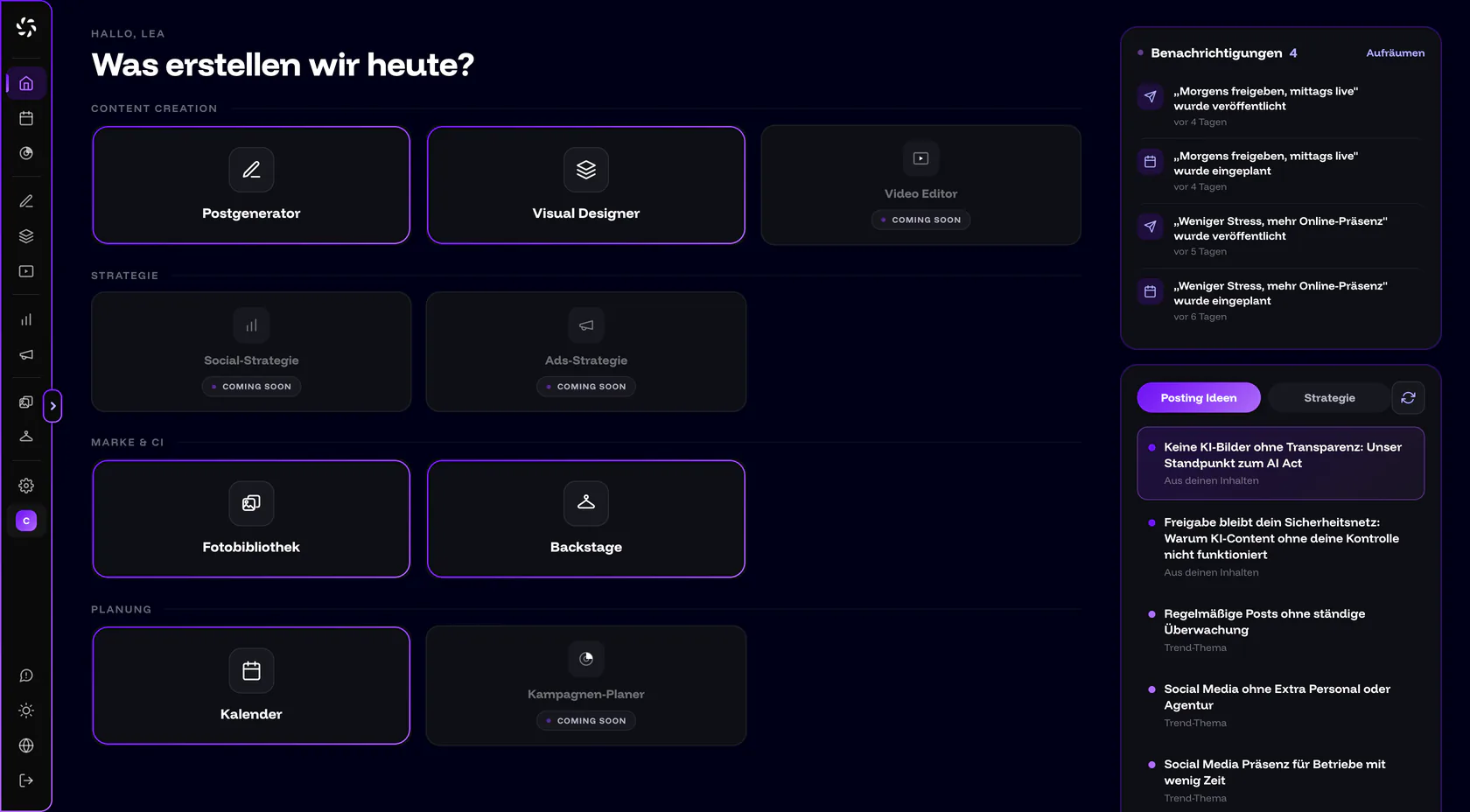
On Home, you start with an idea from Post ideas; the text is created in the Post Generator, the image in the Visual Designer. In the Calendar you schedule the date, after which companycore publishes automatically. More on companycore.ai.
Frequently asked questions
How much time does social media take per week?
By this system, about 60 minutes per week for 2–3 posts, plus 30 minutes once a month for photos. That is a planning value, not a study. In the first weeks it can take longer.
Is it still worth starting with social media?
If your customers are there, yes: 63% of people aged 14 and over use social networks weekly (ARD/ZDF Media Study 2025), and 56% of trades businesses have a presence on social media (Bitkom, October 23, 2025). Which platform fits is in Which social media platform fits my business?.
Do I have to shoot videos myself?
No. On Instagram, Facebook and LinkedIn, photos or carousels are enough. For YouTube Shorts you need video; TikTok also supports photo posts.
How many platforms should I cover when I have little time?
One or two. Every additional platform means more adaptation work per post.
Sources
- TikTok: Community Guidelines, Integrity and Authenticity, retrieved October 13, 2026 (primary source)
- Media Perspektiven: ARD/ZDF Media Study 2025, Social media between growth and saturation (in German), 2025 (primary source)
- Bitkom: Half of the trades sector uses social media (in German), October 23, 2025 (primary source)
- Buffer: How often should you post on Instagram, August 13, 2025 (study)
- Buffer: How often should you post on LinkedIn, August 28, 2025 (study)
- Buffer: How often should you post on TikTok, October 8, 2025 (study)
- Business Punk: What does a social media agency cost in 2026? An honest look behind the scenes (in German), 2026 (provider statement in a brand article, not an independent market study)
Was this article helpful?