

After your first post: how to keep going
Your first post is scheduled. Now it’s about consistency: a fixed rhythm, series with templates and a core that remembers your preferences.
Time needed: about 5 minutes to read. The weekly routine below takes 30 to 60 minutes per week.
How often should you post?
As a guideline, aim for 2 to 5 posts per week per platform. Buffer analyses from 2025 give 3 to 5 posts per week for Instagram (study of August 13, 2025), 2 to 5 for LinkedIn (August 28, 2025) and 2 to 5 for TikTok (October 8, 2025). These are correlations from the data of tool customers, not guarantees. For YouTube Shorts, YouTube doesn’t give a minimum number (accessed October 13, 2026). More in How often to post.
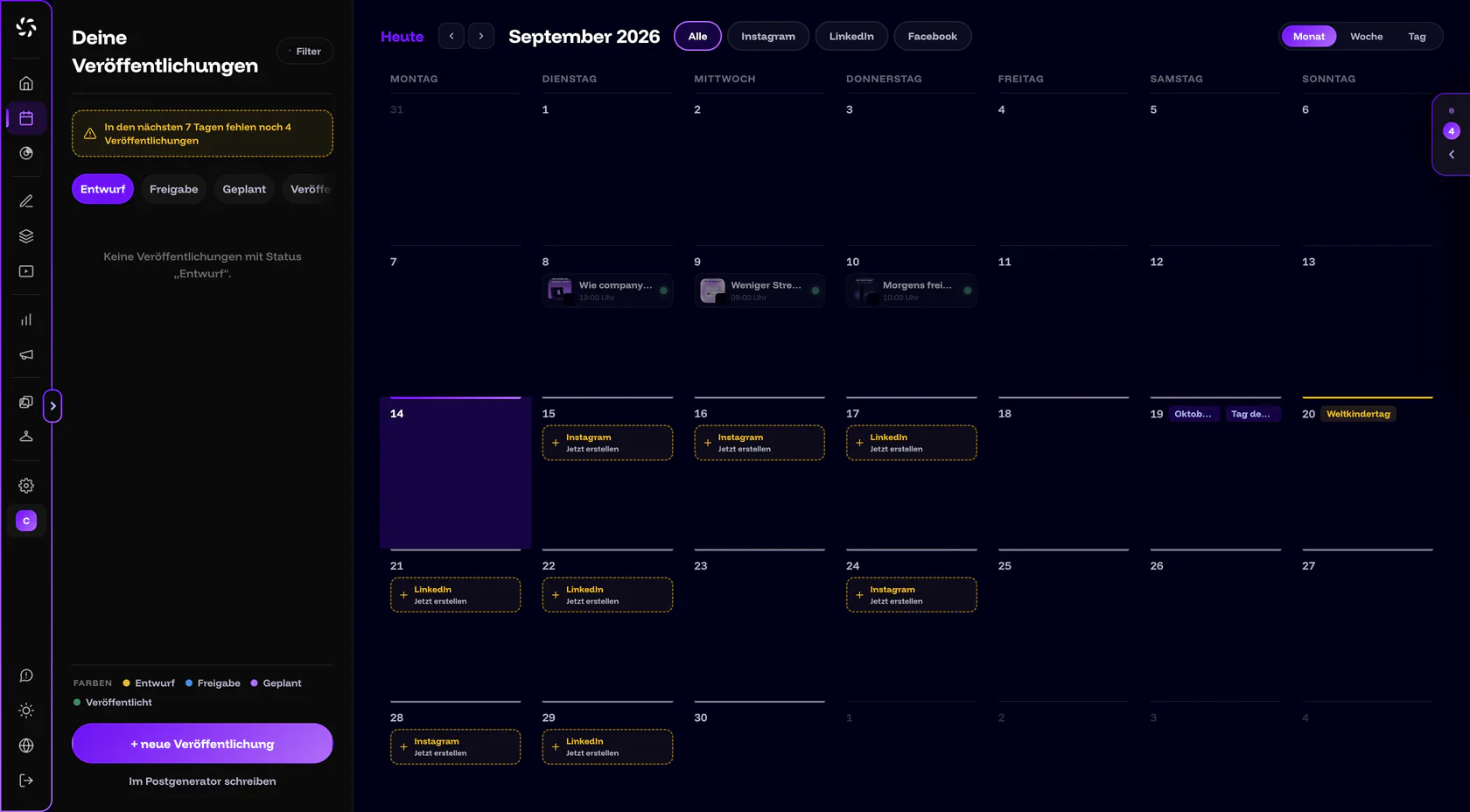
The Calendar helps you stay consistent. By default, it suggests free days so that 3 posts per week add up, from Monday to Friday. The weekend only comes in from 5 posts per week. Public holidays stay free of suggestions, and special days are preferred. A suggestion appears as a dashed tile with the channel and Create now. Above the list on the left, “4 publications still missing in the next 7 days” warns you, and clicking it jumps to the next suggestion. The Calendar doesn’t suggest times, only days.
How do you teach core your preferences?
Just tell core in the chat. With “remember: …”, core saves the entry and confirms with a chip (“Noted” or “Remembered”). With the default setting Ask first, core also asks by itself whether it should remember something (“Should I remember this?”, with Yes, remember and No). Remembered wishes feed into later texts and images. Under the answers, you can see how many preferences core took into account. Examples from the app:
- “remember: no em dashes”
- “never stock-photo smiles in our images”
- “we address customers formally, always”
You see, change and delete all entries under Backstage › core memory. More in core memory.
How do you build series with templates?
If you have a design you want to repeat, you save it in the Visual Designer with Save as template. You give it a name and decide for each layer whether the layer is “Replaceable content” or “fixed”. For a trades business, a “Project of the week” template could be built like this: photo, heading and location are replaceable, while logo and color area stay fixed.
For the next post, you open Templates. Clicking a template opens it as a new draft, and Fill in content appears on the left with the replaceable fields. You can also ask core: “fill the template with …”. Then core writes the fields from your topic or post. More in Carousels and templates.
How do real people and products get into the image?
In Backstage, you create Models, Products and Environments. A model is an AI double of you or your team and is created from a few targeted photos. For this, you agree to a consent form; the details are in the privacy policy. In the Visual Designer, you choose them in the Photo type under Person, Product and Environment. companycore doesn’t invent recognizable people. Recognizable people in images only come from your model or your own photo. More in Models and AI double and Products and environments.
When do you bring your team in?
From the Pro plan, which includes up to 5 users, you invite colleagues under Settings › Team: enter Email address, choose a Role (Editor or Viewer, Client only on the Max plan) and click Invite. Each person gets their own login, and a shared login doesn’t work. Under Settings › Permissions, the owner decides what editors can do. The Approval for scheduling switch is on by default: posts from editors then only go out after approval by an admin or the owner. More in Team and brands.
What does your weekly routine look like?
Plan 30 to 60 minutes per week. Here’s a suggestion you can adapt to your rhythm:
- Monday: choose topics. In the Post Generator, open an empty draft and pick the week’s topics from the topic stack. With Adjust, you copy a topic into the input field and add to it, and with Use → you have core write right away. Clicking an idea under Post ideas on Home also creates a draft right away.
- Tuesday: create copy and images. Write the copy in the Post Generator and design the images in the Visual Designer. For series, use a template.
- Tuesday or Wednesday: schedule. In the Calendar, fill the suggested days with Create now and schedule the finished drafts with Schedule publication. The notice “… publications still missing in the next 7 days” shows how many are still missing.
- Friday: check the Calendar and notifications. Look at the Planned segment and at the Notifications on Home. You reply to comments directly on the platform, because companycore doesn’t show comments.
Look at the Calendar once a week
If a post has failed for good, companycore doesn’t send it again by itself. You see it in the Calendar as Failed and get a notification. With Reschedule, you send it off again. More in Post not published.
Where to next?
Sources
- Buffer: posting frequency on Instagram, study of August 13, 2025
- Buffer: posting frequency on LinkedIn, study of August 28, 2025
- Buffer: posting frequency on TikTok, study of October 8, 2025
- YouTube Help: recommendation for Shorts, accessed October 13, 2026
Result
You know your rhythm, you have a weekly routine and you know where to expand core, templates, models and the team. That completes the course.
Was this article helpful?