

Text settings: how companycore learns your tone
companycore writes from your brand profile, your documents and your settings – and learns from your published posts. In the Text Settings you set the defaults that apply to every new post.
Where does companycore learn your tone?
The tone of a post comes from several sources, not from a single field. These sources feed in:
- Your brand profile: company name, industry, target audience and value proposition. You maintain the brand name and website under Backstage › Company.
- Your company content: PDF or text as a factual basis.
- The CI analysis: tone of voice, language style and content pillars, plus form of address (Du for informal or Sie for formal) and perspective (I, We or Neutral).
- Your text settings: goals, tone, post language, length and post style.
- Your writing style sample: a sample text whose rhythm companycore mirrors.
- The core memory: rules you have told core.
- Your posts: companycore learns your style from posts you published through companycore. It doesn’t repeat topics that have already been covered.
This overview shows where you set what:
| What | Where | Effect |
|---|---|---|
| Form of address (Du or Sie) | Backstage › CI Overview, Tone of voice card | How companycore addresses your audience. |
| Perspective (I, We or Neutral) | Backstage › CI Overview, Tone of voice card | Whether posts are written in the first person singular, in the first person plural or neither. |
| Tone points, language style, content pillars | Backstage › CI Overview, Tone of voice card | Describe how your brand sounds and what it talks about. The analysis pre-fills them, and you can change them. |
| Post goals and tone | Backstage › Text Settings, Defaults section | Default for every generation. Also feeds into the CI analysis. |
| Post language | Backstage › Text Settings, Defaults section | Language of the posts, the topic suggestions and the texts in the Visual Designer. |
| Post length | Backstage › Text Settings, Defaults section | Guideline for new drafts. |
| Writing style sample | Backstage › Text Settings, Inspiration text section | A sample text whose rhythm and tone companycore mirrors. |
| Post style | Backstage › Text Settings, Post style section | Soft guideline for how a post is structured. |
| Tone, goal and length for a single post | Post Generator, left panel Post text settings | Applies to this draft only. |
| Standing rules as sentences | Backstage › core memory | Apply to future posts. More in core memory. |
Defaults: goals, tone, language and length
Open Backstage › Text Settings. According to the app, the Defaults section is used “as the default for every generation”. If you chose goals and sound at your first login, the fields are pre-filled. You save changes with Save.
- Post goals: free text on what your posts should achieve. The field also feeds into the CI analysis.
- Tone / style of posts: free text, for example “approachable, but sharp on substance”. The field feeds into the CI analysis and acts as a fallback tone if the analysis doesn’t detect one.
- Post language: free text, German by default. The language applies to posts, topic suggestions and texts in the Visual Designer.
- Post length: Short (~50 words), Medium (~90 words) or Long (~150 words). This is the default for new drafts and a guideline, not a hard limit.
Memory beats settings
If the core memory contains a rule about length, it takes priority over Post length and over the length in the Post Generator. If the length is off, look there first.
Writing style sample and post style
Writing style sample
In the Inspiration text section, enter a sample text under Writing style sample (optional). Use a real post that went out that way and went over well. companycore picks up rhythm and tone, not the content. Up to 1,500 characters take effect.
A sample is a voice reference, not a rulebook. For firm rules like “we address customers formally, always”, use the core memory.
Post style
Under Post style you choose one of five cards with a preview image: Standard, Formatted, Chunky, Short or Lots of emojis. The style is a soft guideline for how a post is structured, not a fixed template. Try it on two or three posts and compare.
Du or Sie, I or We?
These two settings aren’t in the Text Settings. You find them in the CI Overview on the Tone of voice card.
| Choice | Meaning according to the app |
|---|---|
| Address: Du | Casual and direct. |
| Address: Sie | Formal and professional. |
| Who speaks: I | “One person speaks: coach, consultant, solo business. Posts are written in the first person singular.” |
| Who speaks: We | “The company speaks as a team. Posts use ‘we’, never ‘I’.” |
| Who speaks: Neutral | The brand speaks without I and we. |
Rule of thumb: if your face is the brand, choose I. If the business speaks as a team, choose We. You can switch either one at any time.
Make a single post sound different
In the Post Generator you override tone, goal and length per post. Your defaults stay untouched. Under Post text settings, the tone options are the chips Brand tone, Professional, Casual, Inspiring, Humorous and Direct. You pick the Goal from Reach, Engagement, Leads, Branding and Information.
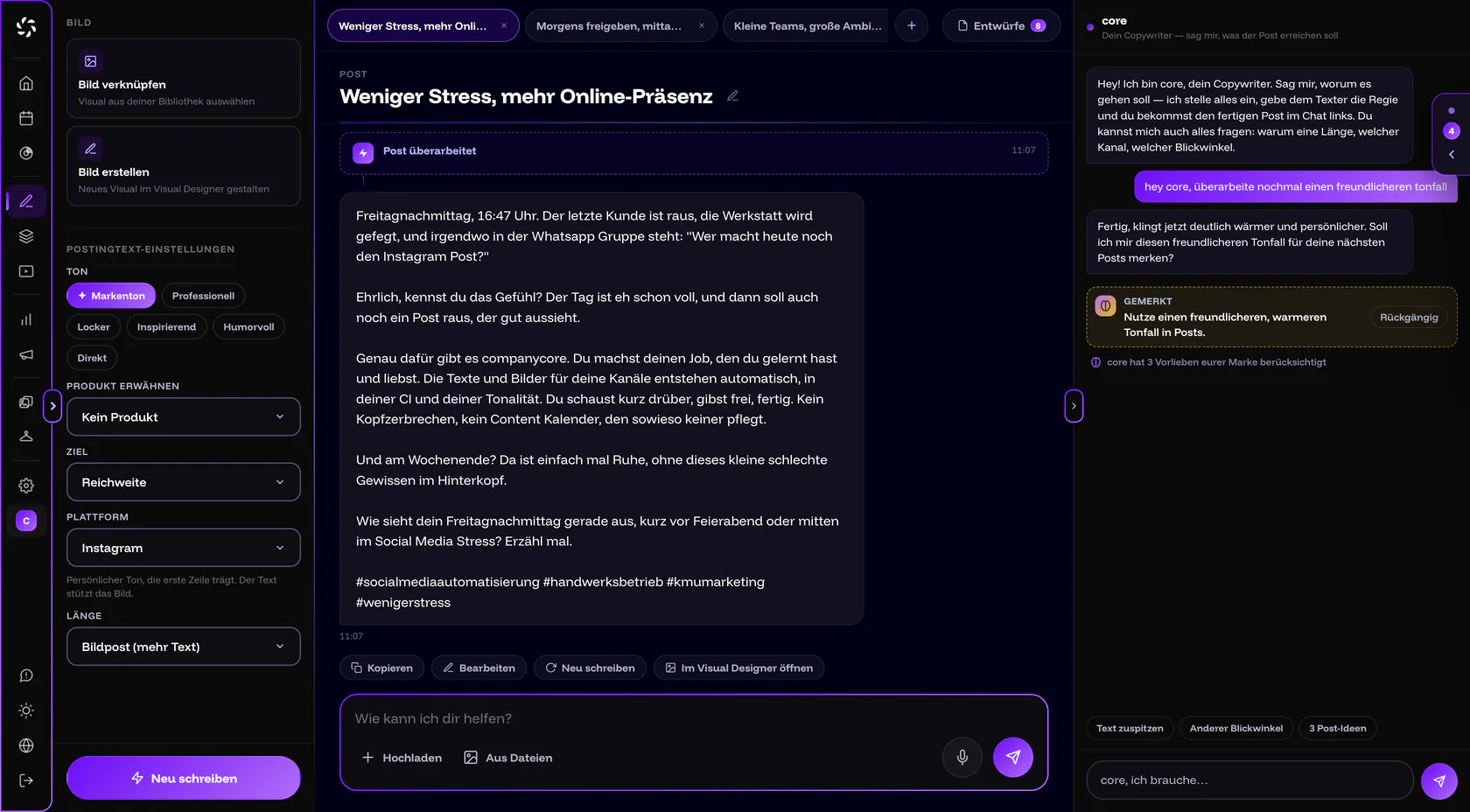
Brand tone only appears if the CI analysis has detected a tone. It is then preselected. core can also set a free-form tone, such as “warm and approachable”. It appears as its own chip.
If you change a setting after a text already exists, the Post Generator offers two ways forward: Revise keeps the substance and only adjusts what changed. Rewrite rebuilds the text on the same topic. More in the Post Generator.
How to make your brand tone unmistakable
- Pick three adjectives. Enter them as Tone points in the CI Overview, for example “down-to-earth, clear, friendly”. Add lets you add more.
- Write rules as short sentences into the core memory. One rule per entry, for example “we address customers formally, always”.
- Specify your own terms. Tell core which words you use and which you don’t, such as “remember: we say clients, not end consumers”.
- Use a real favorite post as your writing style sample. Not a draft, but a text that really went out that way.
For inspiration, here are four examples of your own entries. These are not app defaults.
| Business | Tone points | Address | Who speaks |
|---|---|---|---|
| Hair salon | casual, warm, personal | Du | We |
| Electrical contractor | down-to-earth, clear, reliable | Sie | We |
| Commercial cleaning company | matter-of-fact, reliable, friendly | Sie | We |
| Solo coach | approachable, expert, direct | Du | I |
Frequently asked questions
Where do I set Du or Sie?
In Backstage › CI Overview on the Tone of voice card under Address. There is no field for it in the Text Settings.
Can I change the tone for just one post?
Yes. In the Post Generator, choose a different tone chip under Post text settings. It applies to this draft only; your defaults stay as they are.
Will companycore then write exactly like my sample?
No. companycore mirrors the rhythm and tone of the sample but doesn’t take over its content. Up to 1,500 characters take effect.
Can I post in English?
Yes. Set Post language to English. This also applies to topic suggestions and texts in the Visual Designer, but not to the language of the app interface.
Why is the “Brand tone” chip missing in the Post Generator?
The CI analysis hasn’t detected a tone yet. Start the analysis or enter the tone under Tone / style of posts.
Who can change the Text Settings?
Owners and admins. Editors need the Edit brand & CI permission, which the owner grants under Settings › Permissions. Viewers can only look at the settings.
Was this article helpful?