

What companycore can’t do (yet)
companycore creates, schedules and publishes posts. Some things it leaves out on purpose, some are still in the works, and some have limits. It’s all on one page, so you don’t have to search.
What companycore deliberately doesn’t do
- No publishing of posts you haven’t scheduled. A post only goes out once you’ve actively scheduled it. In teams with approval, the approval comes on top. More in Schedule a post and Approvals.
- No invented, recognizable people. People in images only come from your model or your photo. In the Photo posting type without a person, at most anonymous figures appear, for example from behind or as a silhouette. In the Graphic type, no invented people or hands should appear. companycore’s instructions don’t provide for them.
- No text and no logo painted into the image. Texts, logo and shapes are always editable layers that you can change at any time.
- No bold and italic through special characters. The platforms can’t do it, and such characters appear as plain text. So the text tool offers emojis, bullet points and characters such as • → — ✓.
- No secret removal of the AI label. Images that could look like real photos carry the label “AI-GENERATED” or “AI-MODIFIED”. You can only turn it off through a dialog with a required checkbox, and core can’t turn it off. See AI labeling in companycore.
What’s in the works
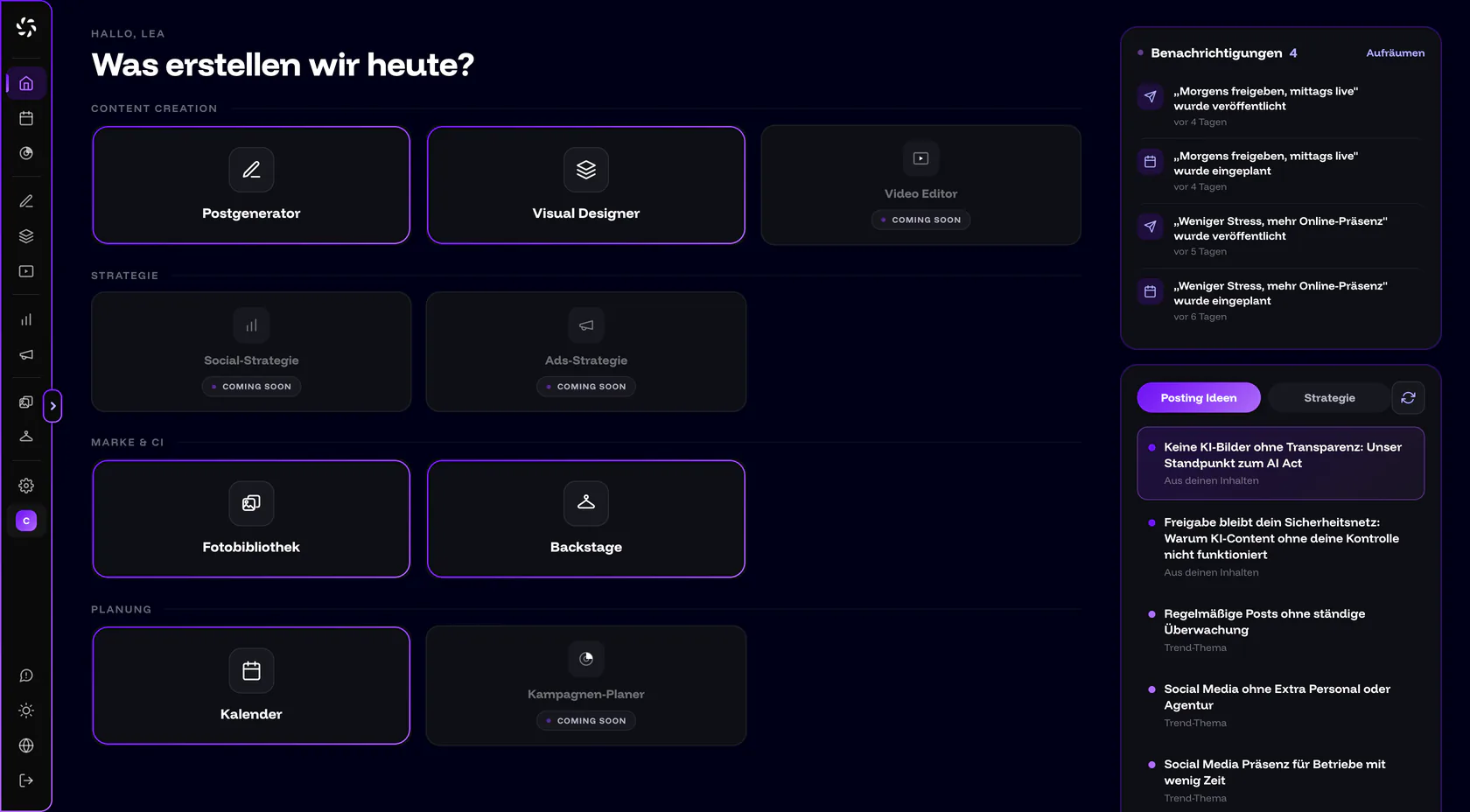
These areas carry the badge “Soon” in the sidebar and “Coming soon” on Home. A click opens a “coming soon” page. None of the items has a date.
| Feature | Status | Until then |
|---|---|---|
| Video Editor | In development. The idea: build finished Reels and Shorts from photos and clips, with cuts, subtitles and music. | You upload finished videos to Files (up to 3 minutes) and schedule them in the Calendar. |
| Campaign Planner | In development. The idea: plan multi-part campaigns over weeks. | Schedule posts one by one in the Calendar. It suggests free days. |
| Social Strategy | In development. The idea: content pillars, audiences and posting rhythms in one place. The Strategy tab on Home only shows a “Coming soon” preview. | You set goals and tone under Backstage › Text Settings, and topic pillars in the CI Overview. |
| Ads Strategy | In development. The idea: derive paid campaigns from your best posts. | companycore doesn’t run or manage ads. That’s also true if the Max plan card in the app mentions “Ads management”: it’s planned but not available yet. |
| Feed DNA | Marked “Coming Soon” in the CI Overview. The idea: companycore automatically learns how your posts are built. | You set the look through reference images and image styles in the CI Overview. |
| Reports and statistics | Planned, no date. Today the app shows no reach, likes or followers. | The receipt in the Calendar leads to the post on the platform through View. You find the numbers there. |
| Comments | Planned, no date. companycore doesn’t show comments and doesn’t answer them. | Answer comments directly on the platform. |
Which limits apply today?
These things don’t work with companycore. On the right is what you do instead.
Scheduling and publishing
| That doesn’t work | Instead |
|---|---|
| An automatic “best time” | You set date and time yourself. The Calendar only suggests free days, not times. What studies say about timing is in Best time to post. |
| Changing or deleting published posts in companycore | Change or delete them directly on the platform. The app says: “This post is out. Here is what went live. Nothing can be changed anymore.” |
| A time zone other than German time in the Calendar | All dates use Europe/Berlin. Convert your times. The editor shows “Times shown in German time”. |
| Filtering holidays by German state | The Calendar shows nationwide and regional holidays of all German states. You add your own dates with a right-click. |
| A reason when rejecting an approval, letting the client move dates | Tell the creator directly what should change. The agency can move dates. |
| Uploading videos over 3 minutes | Shorten the video beforehand. The limit applies in Files and in the editor. |
| Direct messages, comments and community management | That happens directly on the platform. |
Channels and formats
| That doesn’t work | Instead |
|---|---|
| Publishing on personal Facebook profiles or in groups | companycore publishes to Facebook Pages. Create a Page for that. |
| Choosing a different Page or profile for each post | One target applies per brand and platform. Several accounts of the same platform work through several brands, from Pro. |
| Text or a link sticker in Stories | Put the text into the image as a layer in the Visual Designer. There’s no link sticker. |
| Tagging people on LinkedIn or Facebook | Instagram and TikTok link mentions. LinkedIn only links company pages, and on Facebook it stays plain text. |
| Adding music, trial Reels, hiding likes, turning off Instagram comments | Use the Instagram app for these. Notes on music are in Music in Reels. |
| TikTok for every account | TikTok is being rolled out step by step. The card only appears once it’s enabled for you. Connect TikTok gives the current status. |
Creating content
| That doesn’t work | Instead |
|---|---|
| Opening or editing videos in the Visual Designer, linking videos in the Post Generator | Cut videos beforehand with a program of your own, upload them to Files and schedule them in the Calendar. In the Post Generator, you only link images. |
| Working directly on the stage of the Visual Designer on a phone | There, the stage is only a preview, and you work through Settings and core. Full editing works on a tablet and desktop. |
| Swapping a model’s photos after creating it | Delete the model and create it again. See Models. |
Account, team and data
| That doesn’t work | Instead |
|---|---|
| An app from the App Store or Play Store, offline use | companycore is a web app at app.companycore.ai and runs in your phone’s browser. Through the browser menu, you can add it to your home screen as an icon. |
| Exporting everything at once, deleting the account with a click | Back up content one piece at a time. You send the deletion request by email to jan@companycore.ai. See Cancel and your data. |
| Changing the login email | Describe your case by email to jan@companycore.ai. |
| Using a login on several devices at the same time | Every person gets their own login, from Pro under Settings › Team. |
| Buying quota in the app | Switch the plan or write to jan@companycore.ai. See Usage and quotas. |
Missing something?
Click Feedback at the bottom of the sidebar and write two sentences. A human reads it.
Frequently asked questions
Is there a companycore app for iPhone or Android?
No. companycore is a web app at app.companycore.ai and runs in your phone’s browser. Only the stage in the Visual Designer is just a preview on a phone.
Does companycore show statistics for my posts?
No. There are no reach, like or follower numbers, and reports are planned without a date. The receipt in the Calendar shows the link to the post on the platform.
Can companycore run ads?
No. Ads Strategy is in development. Today, companycore doesn’t run or manage ads.
Can I cut videos in companycore?
No. The Video Editor is in development. You can upload finished videos to Files, where they can be up to 3 minutes long, and schedule them in the Calendar.
When will the missing features arrive?
There’s no date for that. The areas in the sidebar are in development. Everything else you can use today.
Was this article helpful?