

Content ideas for businesses: 100 ideas by goal
Good posts answer a question, show proof or take people behind the scenes. Here are 100 ideas sorted by the goal your post should reach, each with a format, an effort level and an example hook.
As of October 13, 2026
Figures describe the situation in October 2026. Changes: October 13, 2026 – first version. Next review: January 2027.
How to use the list
Every idea has a format, an effort level and an example hook, meaning a first line you can open the post with. The hooks are made up, and so are the figures, names and prices in them. Replace them with your real details and check that the statement is true for your business.
- Format: Image is a single photo or graphic, Carousel is several images to swipe through, Reel is a short vertical video and Story is an image or video in portrait format. The format is a suggestion; most ideas also work in another one.
- Effort: 1 means a photo and a few sentences. 2 means some preparation or several images. 3 means you need to shoot a video or arrange an appointment with a customer. That is our estimate, not a measurement.
- Selection: Pick the goal that matters right now and take two or three ideas from it for the next few weeks. You don’t need all 100 at once.
Recognizable people
If you show customers or employees recognizably, you usually need their consent (§ 22 KUG, the German law on the right to your own image; link in German). This is not legal advice. What to watch for is explained in Photos of employees and customers.
Building trust: 20 ideas
New customers don’t know you yet. These posts show that you master your craft and work honestly.
| Idea | Format | Effort | Example hook |
|---|---|---|---|
| Customer quote as a quote image (name the source, use a name only with consent) | Image | 1 | “On time, clean, friendly.” That’s what a customer wrote us after her bathroom remodel. |
| Before and after of a job | Carousel | 1 | Before: tiles from the eighties. After: the same room, four days later. |
| Master craftsman’s certificate (Meisterbrief) or other credential explained | Image | 1 | What does “Meisterbetrieb” (master craftsman business) actually mean? Three things you get out of it. |
| A mistake from everyday work and what you made of it | Carousel | 2 | Something went wrong for us last week. Here’s what happened and how we fixed it. |
| Tool tip: the one tool you’d never give up | Reel | 2 | This tool costs €15 and saves me half an hour every day. |
| A work step in time-lapse | Reel | 2 | Painting a facade, in 30 seconds. |
| Why you use this material | Carousel | 2 | Why we don’t use cheap paint: the difference after two years. |
| A myth from your industry | Image | 1 | “Dark hair can’t be lightened.” Not true, and here’s the gentle way to do it. |
| The start of the workday | Story | 1 | Half past six in the bakery: this is how our day starts. |
| A job in five steps | Carousel | 2 | From inquiry to handover: this is how a job runs with us. |
| Trade guild (Innung), seal or membership explained | Image | 1 | We’re a guild business. Here’s what that gets you on a job. |
| The final inspection checklist | Reel | 2 | Before we leave, we check these seven points. |
| Introduce suppliers and partners | Image | 1 | The wood for this counter comes from the next village over. Here’s where. |
| What your money really goes toward | Carousel | 2 | What’s in an hourly rate, broken down honestly. |
| Repair instead of buying new (honest advice) | Image | 1 | We advised against replacing the heating system. Here’s why. |
| Show your aftercare | Image | 1 | Two weeks after handover, we call. Why we do that. |
| A reference project in detail | Carousel | 3 | A row house from the sixties, every renovation step at a glance. |
| What’s in the service van | Reel | 2 | This is in every one of our service vans. And this never is. |
| The day in numbers | Image | 1 | Today: three appointments, 42 kilometers, one coffee too few. |
| A difficult project in hindsight | Carousel | 3 | This project took us three attempts. Here’s what we learned. |
Winning inquiries: 20 ideas
These posts answer what interested people want to know before they call: What does it cost, how does it work, when do you have time?
| Idea | Format | Effort | Example hook |
|---|---|---|---|
| A price example with the conditions | Image | 1 | What does installing a roof window cost? An example from April, with everything that comes with it. |
| “When is … worth it?” as a decision aid | Carousel | 2 | When is new flooring worth it, and when is sanding enough? |
| A seasonal reminder | Image | 1 | Get your heating serviced now, before it gets cold. |
| Name free appointments | Story | 1 | Three appointments are still free this week. Thursday from 2 p.m., for example. |
| The question of the week from everyday work | Image | 1 | The question we hear most: how long does hair color last? |
| What you get from us and what you don’t | Carousel | 2 | This is what we do. And this is what we explicitly don’t do. |
| How booking works | Reel | 2 | Three steps to an appointment: this is how you reach us. |
| A typical problem with process and ballpark price | Carousel | 2 | Clogged drain on a Sunday? This is how our emergency service works, and this is what the bill looks like. |
| Availability and emergency service | Image | 1 | Burst pipe? Save this number now. |
| Checklist before the first meeting | Carousel | 2 | This is what we need from you so your quote doesn’t take long. |
| Learning to read a quote | Image | 1 | This is how you read a quote: these four lines are what matters. |
| Name the current wait time honestly | Image | 1 | Currently six weeks until an appointment. Here’s why the wait is worth it. |
| Show your service area | Image | 1 | This is where we work: we drive to these five neighborhoods. |
| An earlier appointment would have saved money | Carousel | 2 | A small crack, big damage: what an early appointment would have saved. |
| Three things you can check yourself | Carousel | 2 | Three minutes before you call us: you can check this yourself. |
| The first 30 days of working together | Carousel | 2 | This is how we start with new properties: week by week. |
| A fixed-price package | Image | 1 | The all-in package for apartment handover: this is included, this is what it costs. |
| What you can bring to your appointment | Story | 1 | Appointment booked? Here’s what to bring. |
| Answer a customer question on video | Reel | 2 | “How long does it take?” Here’s the honest answer. |
| Explain the fastest way to reach you | Image | 1 | This is the fastest way to reach us: message, call or book via the link in our bio. |
Winning employees and apprentices: 20 ideas
Applicants want to see how things really work at your place. Show everyday life, people and conditions before you post a job ad.
| Idea | Format | Effort | Example hook |
|---|---|---|---|
| The first day at the company | Reel | 2 | My first day as an apprentice: what I wish I had known beforehand. |
| Apprentice takeover (the apprentice runs your account for a day) | Story | 2 | Today Lea takes over our account. Ask her your questions. |
| Make pay transparent | Image | 1 | This is what you earn with us in your first year of training. |
| Team breakfast and workplace atmosphere | Image | 1 | Friday is breakfast day with us. Everyone sits at the same table. |
| Training, year by year | Carousel | 2 | Three years of training with us: what you learn when. |
| Profile of a colleague | Image | 1 | Three questions for Mehmet: Why roofing? |
| The open position described honestly | Image | 1 | We’re looking for an installer. This is what the job is really like, the good and the exhausting. |
| What you concretely offer | Carousel | 2 | Company car? No. 30 vacation days and a 2 p.m. finish on Fridays? Yes. |
| Invitation to a trial day | Story | 1 | Trial day on Saturday: come by and try it out. |
| From internship to permanent job | Reel | 3 | Two years ago, Jonas came for a week. Today he’s a foreman. |
| Answer the parents’ question | Image | 1 | Parents ask us: is a trade a safe career path? Our answer. |
| A workday step by step | Reel | 3 | A day as a building cleaner in 60 seconds. |
| What you provide: clothing, tools, work phone | Image | 1 | Work clothes, tools, work phone: we provide these. |
| Further training and promotion | Carousel | 2 | From apprentice to master: this is how we support the path. |
| The boss tells their story | Reel | 2 | Why I founded this company. |
| Applying without a cover letter | Image | 1 | Applying without a cover letter: just send us a message. |
| Apprentices’ successes | Image | 1 | Passed the interim exam with distinction: congratulations, Tim. |
| A prejudice about the profession | Reel | 2 | “It’s just cleaning.” Is that true? |
| A day at vocational school | Story | 1 | Vocational school week: this is what our apprentices are learning right now. |
| Employees recruiting employees | Image | 1 | Know someone who’d fit in with us? Here’s what you get for it. |
Building community: 20 ideas
These posts keep you in touch with people who already know you. They take little effort and don’t need an offer.
| Idea | Format | Effort | Example hook |
|---|---|---|---|
| A vote in the post: A or B | Image | 1 | What color should the new counter be? Write A or B in the comments. |
| The question of the week | Image | 1 | What was your worst renovation disaster? |
| Anniversary | Image | 1 | Ten years ago today we opened our doors. Thank you to everyone who was there. |
| Introduce a local partner | Image | 1 | Our neighbor, the flower shop: why we often work together. |
| Customer of the month (with consent) | Image | 1 | Every Saturday for eight years: our regular customer Ms. Becker. |
| Thank-you after an event | Image | 1 | Thanks for a packed house at our open day. |
| A club you support | Image | 1 | New jerseys for the youth team. Have fun this weekend. |
| Ask people to suggest a name | Image | 1 | What should our new dish be called? Put your idea in the comments. |
| Favorite piece of the week | Image | 1 | My favorite piece this week and why. |
| The weekly recap | Carousel | 2 | Our week in five pictures. |
| Q&A round: customers ask, you answer | Reel | 2 | You asked, we answer: the three most frequently asked questions. |
| Opening hours on public holidays | Image | 1 | On Ascension Day we’re open until 2 p.m. |
| A photo from your neighborhood | Image | 1 | Good morning, Ehrenfeld: this is what the square in front of our door looks like at seven. |
| Welcome new colleagues | Image | 1 | Welcome to the team, Selin. She starts with us today. |
| An activity for the neighborhood | Image | 1 | On Saturday we’re cleaning up the playground. Who’s coming along? |
| Giveaway with clear terms of participation (rules: Planning a giveaway) | Image | 2 | We’re raffling off a €50 voucher. Here’s how to enter. |
| Share a customer photo (only with permission) | Image | 1 | The Roth family sent us this after moving in. Thanks for the photo. |
| A guessing post | Image | 1 | What is this? The answer comes tomorrow. |
| Mishaps and outtakes | Reel | 2 | This didn’t work during the shoot, and we’re showing it anyway. |
| Thank your regular customers | Image | 1 | Thanks to everyone who has been coming since day one. |
Offers and products: 20 ideas
This is where you sell without sounding pushy: you show what’s available, what it’s good for and what matters.
| Idea | Format | Effort | Example hook |
|---|---|---|---|
| Introduce something new | Image | 1 | New in our range: soap from the workshop around the corner. |
| A set or bundle | Image | 1 | The winter saver set: gloves, hat, scarf. Cheaper together. |
| Using the product in practice | Reel | 2 | This is how to use the care oil properly, in 20 seconds. |
| A care tip for the product | Carousel | 2 | How to care for your parquet floor so it stays beautiful for a long time. |
| A time-limited offer | Image | 1 | Only until Sunday: two dishes, one price. |
| A seasonal product | Image | 1 | The first asparagus is here. Fresh from the farm, this week only. |
| The bestseller of the week | Image | 1 | This is what most people took home this week. |
| Two variants compared | Carousel | 2 | Battery or cable? This is what sets the two apart. |
| Goods received or unboxing | Reel | 2 | The new delivery arrived today. Take a look inside. |
| Three ways to use a product | Carousel | 2 | One product, three ideas: how to use our olive oil. |
| Gift voucher as a gift idea | Image | 1 | No gift yet? A voucher for an appointment of their choice. |
| Back in stock | Story | 1 | The bread is back, every day from 7 a.m. |
| Buying guide before the purchase | Carousel | 2 | Which bike suits you? Four questions first. |
| The story behind a product | Reel | 3 | From idea to shelf: how our bestseller is made. |
| A price list to take with you | Carousel | 2 | Our fall prices at a glance. |
| Service of the month | Image | 1 | In focus in October: deep cleaning for carpets. |
| A set for an occasion | Image | 1 | The Mother’s Day package is here: flowers, coffee, card. |
| What you shouldn’t buy from us | Image | 1 | We don’t sell cheap ink. Here’s why. |
| A customer question about a product | Image | 1 | “Is it dishwasher-safe?” Yes, with one exception. |
| The last pieces | Story | 1 | Only five left. After that, not until March. |
20 ideas without a face
You don’t have to show yourself to make good posts. Point the camera at hands, tools, materials or the finished result. The following ideas work without a recognizable person in the picture.
- Hands at work (Reel): camera close to hand and tool, no face in the frame.
- Time-lapse (Reel): camera fixed on a tripod, one work step from start to finish.
- Detail shots (Image): an edge, a seam, a texture or foam, one subject up close.
- Before and after without people (Carousel): same angle, same light, two photos.
- Text carousel (Carousel): tips, myths or a checklist on slides, with no photo at all.
- Tool flat lay (Image): tools or ingredients from above on a calm surface.
- The result alone (Image): the finished room, the plated dish, the hair color from behind.
- Quote graphic (Image): a customer quote or a motto as a graphic.
- Price list as a graphic (Image): services and prices at a glance, no photo.
- Number of the day (Image): kilometers, bread rolls or square meters treated, one big number and one sentence.
- Voice-over to workplace photos (Reel): three or four images with your voice or a text overlay.
- The workplace (Image): workshop, salon, kitchen or office without people, but with atmosphere.
- Product close-up (Image): a product, with one hand at the edge of the frame.
- Service area as a list (Image): the places you drive to, as a graphic.
- Checklist as a graphic (Carousel): seven points to save.
- Weekly schedule or opening hours (Image): as a graphic, new every week or as a template.
- Setup or teardown in time-lapse (Reel): trade fair booth, terrace or construction site.
- References as a gallery (Carousel): five finished projects, results only.
- Two samples side by side (Image): two tiles, two colors, two loaves of bread. Ask which one your followers would pick.
- Original sound (Reel): the sound of the work, cutting, hissing, hammering, with no third-party music. More in Music in Reels.
The graphic ideas (text carousel, quote, price list, number of the day, service area, checklist, weekly schedule) are made in the Visual Designer with the posting type Graphic: type, shapes and colors in your brand’s look, with no people at all.
How do you set content pillars?
A content pillar is a topic area you post about regularly. Three to five are enough: with more you lose track, with fewer your profile looks one-sided. Each post belongs to exactly one pillar, which makes choosing easier.
| Industry | Possible pillars |
|---|---|
| Trades | Projects and references · Knowledge and tips · Team and apprentices · Offers and seasons |
| Hair salon and barbershop | Looks and transformations · Care knowledge · Team and salon · Appointments and offers |
| Hospitality | Dishes and menu · Ingredients and origin · Team and kitchen · Specials and reservations |
| Building cleaning | Results (before and after) · Knowledge for clients · Team and training · Services and inquiries |
| Retail | New arrivals · Advice and tips · Store and team · Promotions |
As a rule of thumb, with no study behind it: about half of your posts should be knowledge and proof, a bit under a third a look inside the business, and the rest offers. That way your profile doesn’t look like a shop window that only wants to sell.
In companycore you maintain the pillars under Backstage › CI Overview in the Tone of voice card at Content pillars. In core memory there is also the Strategy & content pillars section with up to 8 pillars. The Post Generator takes them into account when writing. More in CI Overview and core memory.
Seasons and occasions
Holidays, awareness days and industry occasions give you topics that come up on their own. Which dates are coming up in 2027 and how to turn them into a quarterly plan is covered in Content calendar 2027.
Ideas with companycore
On Home, the Post ideas tab in the right column shows up to 6 topics. They come From your content or are a Trending topic. One click opens the Post Generator with a new draft, and core immediately writes a post on that topic. New suggestions only reshuffles the existing topics.
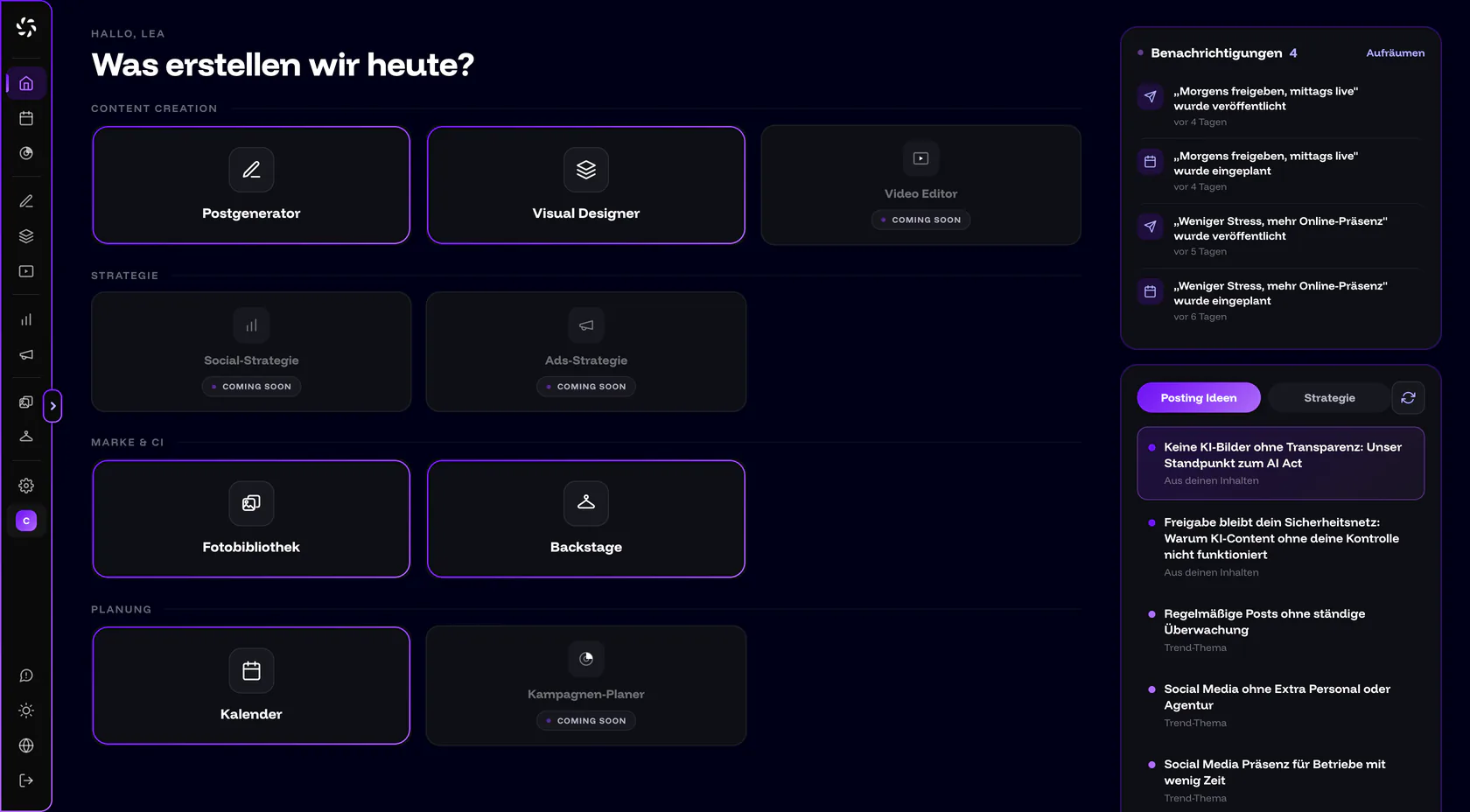
In the empty Post Generator, 3 ideas from core offers suggestions; in the chat with core the quick action is called 3 post ideas. You can hand an idea from this list straight to core as an assignment: Post about… fills the input field with “Write a post about ”, and you add the rest.
The more companycore knows about your business, the better the topics fit. Under Backstage › CI Overview, in the Company content section, upload a PDF (up to 20 MB) or paste text (at least 30 characters), for example your About page or an overview of your services. companycore creates topic suggestions from it. If the card stays empty, see No post ideas.
Where to go next
The industry guides turn the list into a weekly plan for your business.
Frequently asked questions
Are 100 ideas enough for a year?
At two posts a week, they last for almost a whole year. How often you should post is covered in How often should a business post?.
Can I use the same idea on several platforms?
Yes. One photo and one idea can carry several platforms, but the same text can’t: adjust length, tone and opening. You’ll find tips for openings in Hooks, captions and CTAs.
Does every post have to sell something?
No. As our rule of thumb, not from a study, only about one in five posts is an offer. The others show knowledge, proof and behind-the-scenes insights.
Do the ideas work on LinkedIn too?
Yes, especially the knowledge, reference and recruiting ideas. Story ideas don’t apply, because on LinkedIn you schedule posts, documents and videos through companycore, not Stories.
What do I do if Home shows no post ideas?
Then companycore still lacks information about your business. Upload company content in Backstage; the details are in No post ideas.
Was this article helpful?