

My post wasn’t published – what to do?
Whether a post went out, and why not, is shown by its status in the Calendar. With Failed, the post gives the reason in one sentence. After a final error, companycore doesn’t resend on its own: you reschedule the post.
Quick check: what’s up with the post?
- Find the post. Drafts are in the Calendar in the list on the left under Draft, and everything else is in the grid. An active platform filter hides other channels. Failed posts sit in the Planned segment and carry a red counter.
- Read the status. What it means is in the table below.
- Check the date. All times use German time. One to two minutes after the date is normal.
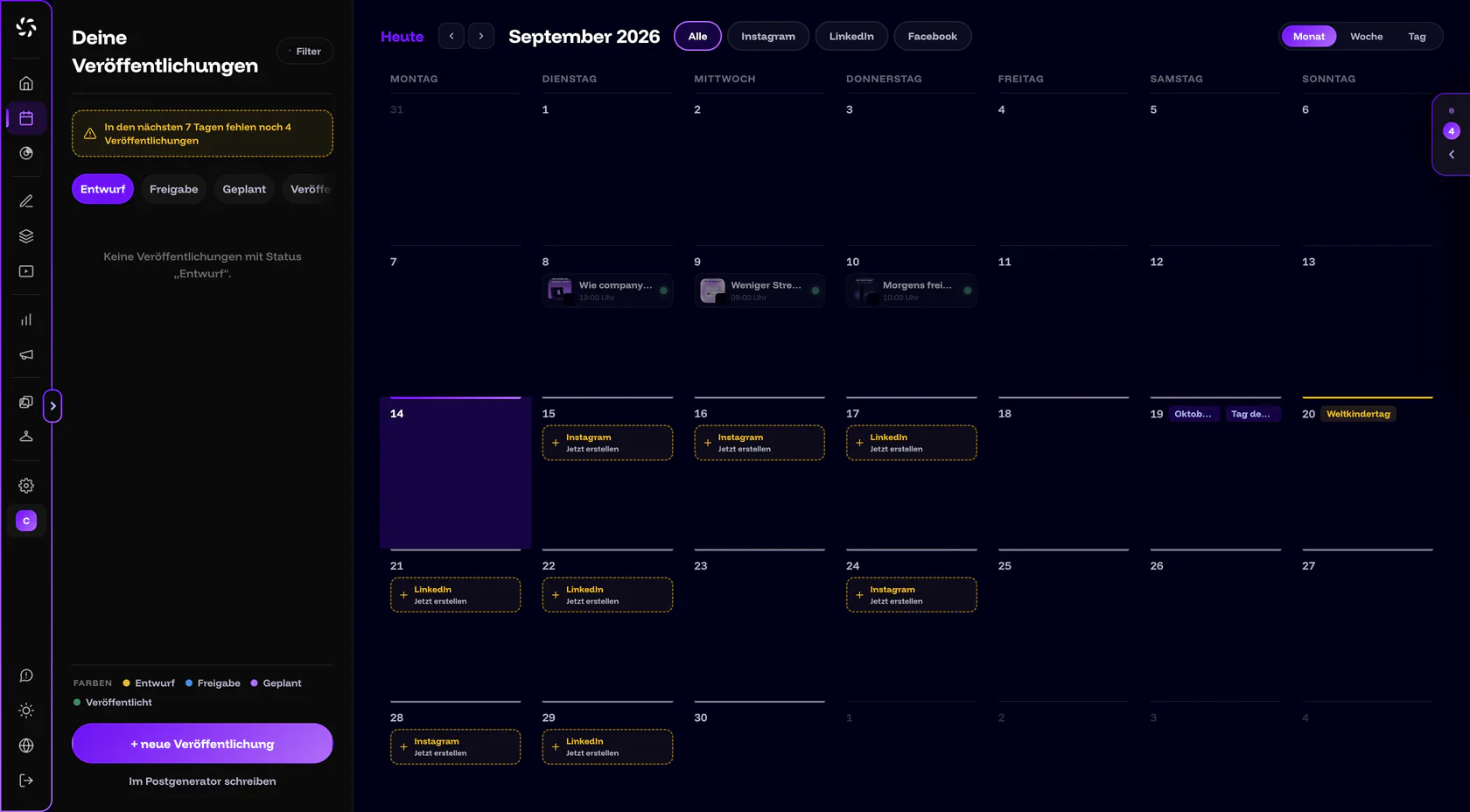
What status does the post have?
| Status | What it means | What you do |
|---|---|---|
| Draft | The post is saved but was never scheduled. It won’t go out. | Open the post and click Schedule publication. |
| Approval or Client approval | The post is waiting for approval. If the date passes without approval, it isn’t published. You get the message “Approval overdue”. | Move the date and have it approved. See Approvals. |
| Planned | The date hasn’t been reached yet. | Check the date and time. They use German time. |
| Publishing | The post is going out right now and is locked. TikTok and YouTube keep processing videos afterwards, which takes minutes to hours. | Wait. The Calendar refreshes itself. |
| Failed | The scheduled time arrived, but the post didn’t go out on any channel. If it only went out on some of the channels, it appears under Published, see “Partly published” further down. | Read the error text, fix the cause, reschedule. |
| Published | The post is out. With “Partly published”, it’s only out on some of the channels. | Open the receipt. It shows time, account, result and the View link for each channel. |
Failed: messages and fixes
Open the post. A red banner sits at the top: “The last attempt failed: …” The sentence after it gives the cause and usually the way forward. Next to it is a short code you can give to support. Messages from the publishing service appear in German in the app, even in the English interface. The tables give the German wording first, followed by the English meaning. The most common messages:
Connection, plan and date
| Message | What you do |
|---|---|
| “Die Verbindung zu {Plattform} ist abgelaufen oder wurde entzogen — bitte {Plattform} in den Verbindungen neu verbinden.” (German; meaning: “The connection to {platform} has expired or was revoked — please reconnect {platform} under Connections.”) | Reconnect the account under Backstage › Connections and reschedule the post. More in Connection expired or disconnected. |
| “{platform}: No page selected — set one in Backstage under Connections.” | For Facebook and LinkedIn, the target is missing. Under Target profile, choose a Page or a profile. The card under Backstage › Connections then shows “No target selected”. |
| “Dein Plan war zum Termin nicht aktiv – Beitrag neu einplanen” (German; meaning: “Your plan wasn’t active at the scheduled time – reschedule the post.”) | No plan was running at the date. Activate it under Settings › Billing (only the owner sees the tab) and reschedule. |
| “Termin liegt mehr als 24 Stunden zurück – nicht mehr automatisch veröffentlicht, bitte neu einplanen” (German; meaning: “Date is more than 24 hours in the past – no longer published automatically, please reschedule.”) | The date was too long ago, for example after an outage. Reschedule the post. |
| “Keine Antwort von {Plattform} beim Veröffentlichen — bitte auf {Plattform} prüfen, ob der Beitrag schon draußen ist, und ihn sonst neu einplanen.” (German; meaning: “No answer from {platform} while publishing — please check on {platform} whether the post is already live, otherwise reschedule it.”) | Look on the platform first. More under “Status unclear” further down. |
| Message | What you do |
|---|---|
| “Das Bild ist für Instagram zu groß (höchstens 8 MB) …” (German; meaning: “The image is too large for Instagram (max. 8 MB) …”) | Replace the image with a smaller file. |
| “Instagram lehnt das Seitenverhältnis ab (erlaubt 4:5 bis 1,91:1) …” (German; meaning: “Instagram rejects the aspect ratio (allowed 4:5 to 1.91:1) …”) | Use an image in the allowed ratio, for example Feed post (4:5) from the Visual Designer. |
| “Instagram lehnt den Beitragstext ab (höchstens 2200 Zeichen, 30 Hashtags und 20 @-Erwähnungen) …” (German; meaning: “Instagram rejects the caption (max. 2200 characters, 30 hashtags and 20 @mentions) …”) | Shorten the text or remove hashtags and mentions. The app cites 30 as a technical limit. According to the Help Center, Instagram itself has allowed only 5 hashtags per post since December 2025 (as of October 2026). More in How many hashtags in 2026?. |
| “Instagram lehnt das Video ab (Format, Codec oder Länge) …” (German; meaning: “Instagram rejects the video (format, codec or length) …”) | The message lists the requirements: MP4 with H.264/AAC, 1080p at most. Upload a suitable video. |
| “Tageslimit von Instagram erreicht …” (German; meaning: “Instagram daily limit reached …”) | Do nothing. companycore waits for the next possible time, which is tomorrow at the same time according to the message. |
LinkedIn, TikTok and YouTube
| Message | What you do |
|---|---|
| “Dir fehlt auf dieser LinkedIn-Unternehmensseite die Rolle zum Veröffentlichen (Super-Admin oder Content-Admin) …” (German; meaning: “You lack the role to publish on this LinkedIn company page (Super Admin or Content Admin) …”) | Ask for one of these roles for the company page on LinkedIn, or choose another target under Target profile. |
| “LinkedIn hält den Text für ein Duplikat eines früheren Beitrags — bitte den Text leicht ändern und neu einplanen.” (German; meaning: “LinkedIn considers the text a duplicate of an earlier post — please change the text slightly and reschedule.”) | Change the text slightly and reschedule. |
| “Vor der TikTok-Freigabe von companycore muss das TikTok-Konto selbst auf privat stehen …” (German; meaning: “Until TikTok has approved companycore, the TikTok account itself must be private …”) | TikTok is being rolled out step by step. In the TikTok app, set the account to private (“Settings → Privacy → Private account”) and reschedule. |
| “Tageslimit dieses TikTok-Kontos erreicht …” (German; meaning: “Daily limit of this TikTok account reached …”) | Do nothing. According to the message, companycore tries again tomorrow at the same time. |
| “YouTube-Kontingent für heute aufgebraucht — neuer Versuch nach Mitternacht (US-Pazifikzeit).” (German; meaning: “YouTube quota for today is used up — retrying after midnight (US Pacific time).”) | Do nothing. companycore tries again later. |
Special cases: retries, partial success and unclear status
Temporary errors: companycore retries on its own
With network problems, timeouts or outages at the platform, companycore resends up to five times, at growing intervals. The editor then says, for example: “… – neuer Versuch in 4 Min (2/5)” (German system text, meaning “… – new attempt in 4 min (2/5)”). You don’t have to do anything.
Only after the fifth attempt does it say “… – nach 5 Versuchen aufgegeben” (meaning “… – gave up after 5 attempts”), and the post is Failed. The platforms’ daily limits don’t count as an attempt. The post then waits for the next possible time: “… – neuer Versuch am {Datum} Uhr” (meaning “… – new attempt on {date}”).
“Partly published”: it worked on one channel, not on the other
The post is then under Published, but it carries the heading “Partly published” and the sentence “Not every channel accepted the post.” In the receipt, you see the result for each channel.
- Open the receipt. Click the post in the Calendar.
- Choose Retry failed channels. The app asks: “Already published channels stay untouched. Edit and reschedule the failed channels now?”
- Fix the cause and reschedule. The channels that are already published are locked (“Already published on {platform} – stays unchanged”).
“Status unclear”: check first, then reschedule
If the platform doesn’t answer at the last step, the post may already be online. The editor then blocks rescheduling and says: “The last attempt on {platform} was cut off without a reply — the post may already be live there. Please check on {platform} first. Rescheduling would otherwise send it a second time.”
Check on the platform first
If the post really isn’t there, confirm with Checked — not live, reschedule. If it’s already out, don’t reschedule, or it will appear twice.
How to reschedule a post
- Open the post. Click it in the Calendar. The red banner gives the reason.
- Fix the cause. Shorten the text, replace the image or video, or reconnect the account, depending on what the sentence asks for.
- Click Reschedule. The date jumps to now plus about 15 minutes, rounded up to the half hour.
- Check the date and click Schedule publication. The app reminds you: “New time: {when} — check above and click ‘Schedule’.”
Instead of using the banner, you can also right-click the post, or long-press it on a phone: Reschedule or Reset to draft. If the error text is missing, it says: “No error text from the service — please reschedule; the next attempt will report back.”
Saving doesn’t resend
After a final error, companycore never resends on its own. Save & close doesn’t change that either. The app then says: “Saved — the post stays ‘Failed’ on its date. Choose ‘Reschedule’ to send it again.”
How to prevent it
- Keep email notifications for errors turned on. Under Settings › Notifications, Publishing failed and Problem before the date are on by default for In the app and Email.
- Watch for the pre-check. If companycore finds a problem before the date, you get Problem before the date: “… may fail at its date — please check”. A new connection, a replaced image or video, or the pending approval usually fixes it.
- Take connection warnings seriously. Connection expires soon arrives 7, 3 and 1 day beforehand. Renew the connection under Backstage › Connections.
All events and settings are explained in Status, publishing and notifications.
Still stuck?
Click Feedback at the bottom of the sidebar, choose Broken and give the code from the red banner. A human reads it. You can also email us at jan@companycore.ai.
Frequently asked questions
Why did my post appear on Instagram but not on LinkedIn?
Then the post is Partly published. Open the receipt and choose Retry failed channels. Instagram stays unchanged.
Can I change or delete a published post in companycore?
No. The app shows: “This post is out. Here is what went live. Nothing can be changed anymore.” Change or delete it directly on the platform.
Will a missed post still be sent later?
Not after a final error. You reschedule it. If the date is more than 24 hours in the past, companycore no longer publishes automatically anyway.
Will my post be published if my plan has expired?
No. Without an active plan, posts are held back, and you get the message “‘{Titel}’ wird zurückgehalten – kein aktiver Plan” (German system text, meaning “‘{title}’ is being held back – no active plan”). Reactivate the plan and reschedule affected posts if needed.
How can I be sure a post is online?
From the receipt in the Calendar. It shows time, account, result and the View link to the post on the platform for each channel.
The post went out later than planned. Is that a bug?
No. companycore publishes each channel separately, at the date or shortly after, and a delay of one to two minutes is normal. For TikTok and YouTube, the platform’s processing comes on top: “Still being processed by {platforms} – this can take a few minutes to a few hours.”
Was this article helpful?